 Skinjot
Skin journal app
A 10-second check-in each day, so weeks later you see what changed in your skin from your records, not your memory.
Why keep a skin journal?
Skin changes slowly. It is hard to remember how it looked a month ago, and good and bad days blur together. When your dermatologist asks "how was last month?", most people guess. A short, regular record fills that gap. Skinjot asks one question: what actually changed in my skin over time?
A paper notebook or a notes app works too, but people tend to stop. Skinjot keeps each entry as short as possible so you can keep going every day. If you are not sure where to start, read how to keep a skin journal.
Daily check-in: 10 seconds, no forms
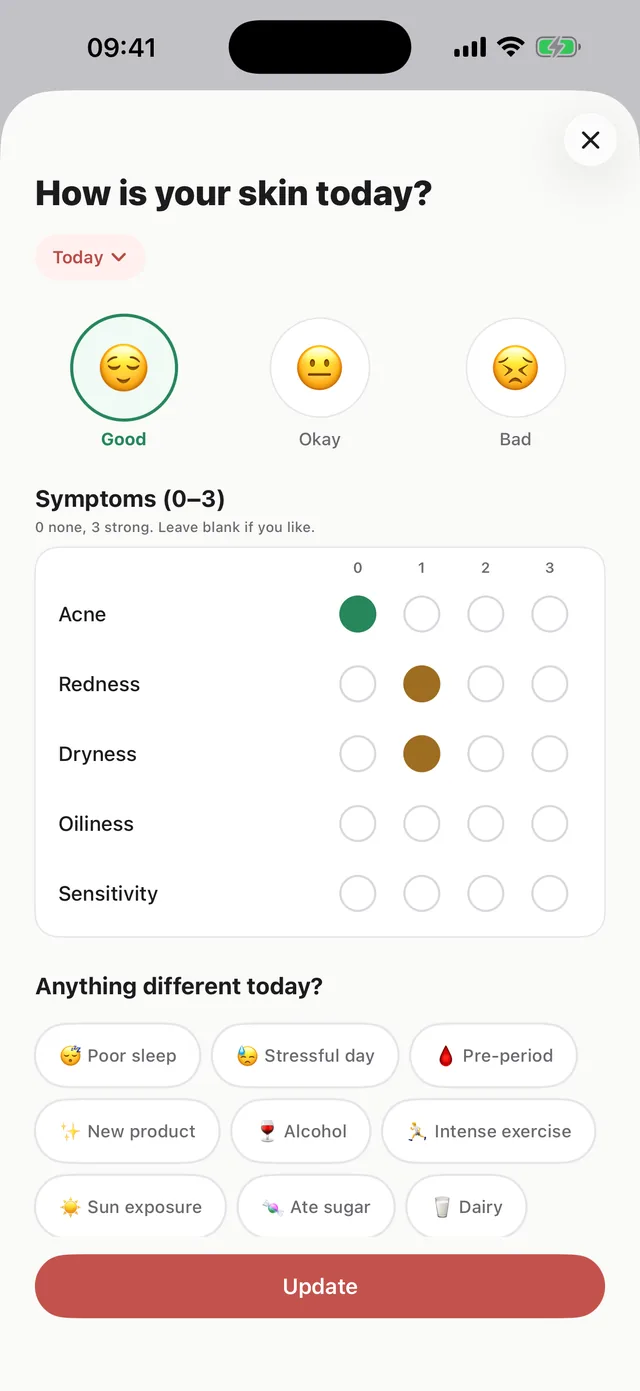
- Overall: pick one of three faces: good, okay, bad. One tap.
- Symptoms (optional): rate acne, redness, dryness, oiliness and sensitivity from 0 to 3.
- Tags: tap what made today different: poor sleep, stressful day, pre-period, new product, sun exposure, alcohol, intense exercise and more.
- More details: notes, products, routine and multi-angle photos live in a separate section, there when you need them.
- Automatic context: if you allow it, last night's sleep from Apple Health and humidity, UV and temperature for your location are added to the entry. Your location isn't stored.
Home: where you are, not a data dump
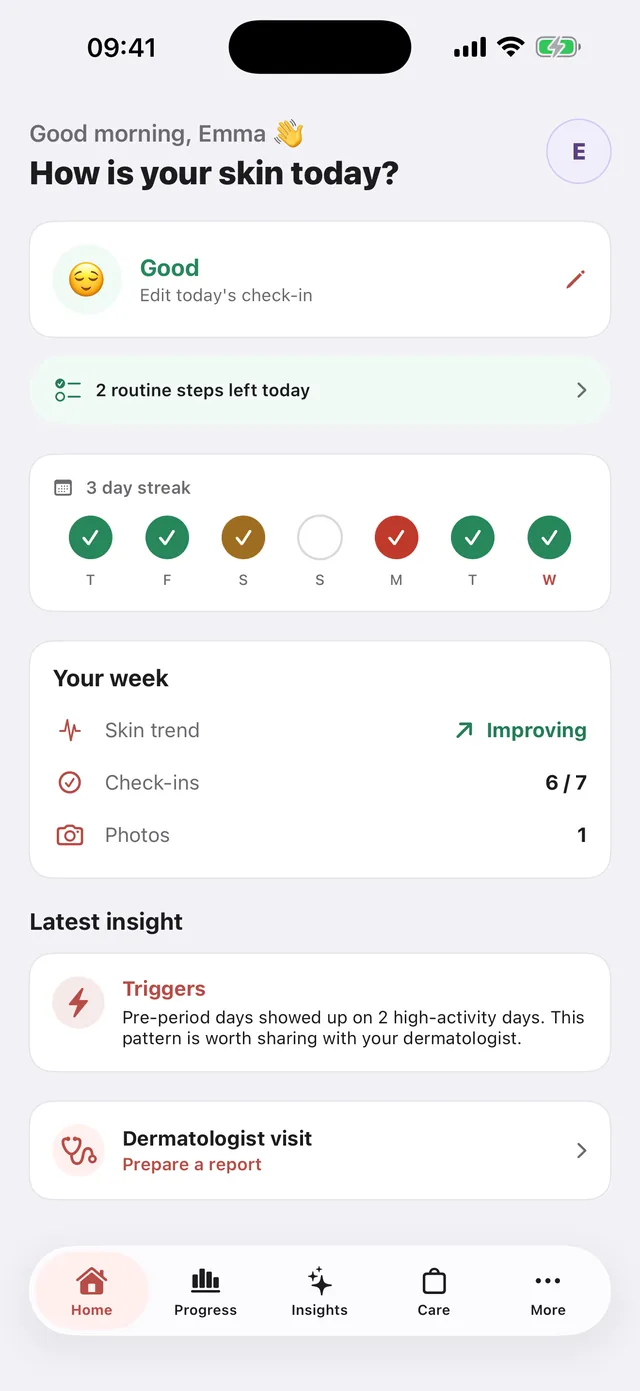
Open the app and you won't see a wall of stats. You see today's check-in, a calm streak, your week and your latest insight. Your weekly skin trend is summed up as improving, stable or worsening. First observations start after a few entries, and your first weekly summary is ready at entry 7.
The streak is a quiet counter that nudges you to log each day. The Home Screen widget only shows whether you logged today and your streak; your scores and photos never appear on it.
Calendar and skin history
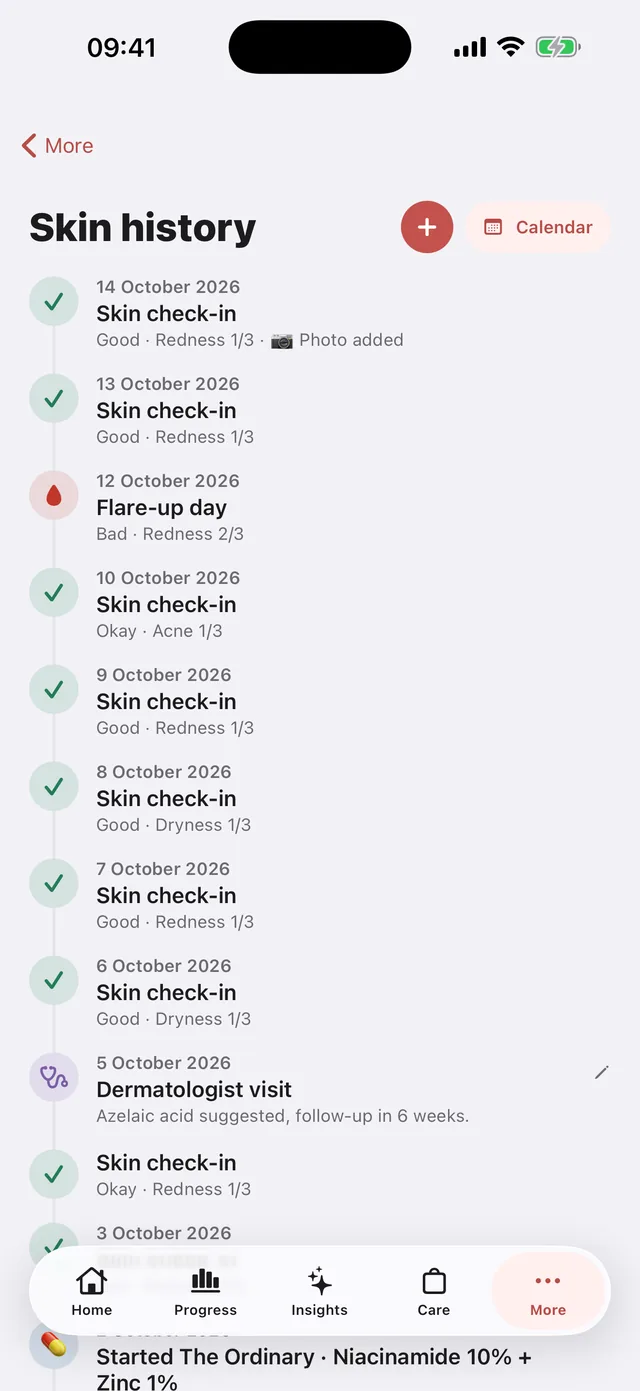
The calendar shows each day's entry, and if you log period dates, your cycle phases sit in the same place. Skin history pulls the story together on one timeline:
- Your check-ins, products you started and stopped, period starts and dermatologist visits in one feed.
- A run of bad days shows up as a single "tough day", so the list stays calm.
- Tap "+" to add a dermatologist visit or a note: "suggested azelaic acid, follow-up in 6 weeks".
Months later, "when was that?" is one scroll away. These records also go into your dermatologist report.
Your records stay with you
You can start without an account. Your entries and photos are stored encrypted on your phone, and you can lock the app with Face ID. No ads, no selling data. When you switch phones, you export a password-encrypted backup from Settings and restore it on the new phone.
Skinjot doesn't diagnose. It shows your records as observations; you make decisions with your dermatologist.
Free: daily check-in, symptoms and tags, Home, streak, weekly summary, calendar, skin history and dermatologist visit notes. Pro: the check-in itself never needs Pro; Pro adds the 90-day report, photo progress and the product timeline. See pricing.
FAQ
Is the daily check-in really 10 seconds?
Yes. Choosing how your skin feels is one tap; symptoms and tags are optional. You add details like notes, products and routine on the days you want.
What if I forget to log a day?
Nothing is lost. Missed days show as empty on the calendar and you pick up with your next entry. Regular entries make patterns clearer, but it doesn't have to be perfect.
Do I need an account?
No. You can start without one. AI features and purchases need an account, and your existing entries are kept when you create one.
Is it on Android?
Not yet. Skinjot is for iPhone, iOS 17 and later.