 Skinjot
Skincare product tracker
Every product is a small personal experiment; Skinjot puts your entries from before and after side by side.
"Is this cream actually working for me?"
A few weeks into a new product, that question is hard to answer. You don't remember how your skin was before you started. Sleep, the season or your cycle may have changed in the same weeks. Skinjot ties the product's start date to your entries, so you see before and after with your own data.
Product add wizard
Add a product in a few steps:
- Scan the barcode: line it up in the frame. If the product is in an open product database (Open Beauty Facts), the name, brand and ingredient list fill in for you. If not, you type the details.
- Search by name or type it in.
- Snap the label: the ingredient list is read on your phone with Apple's on-device text recognition. The photo doesn't leave your phone; you check the text that was read.
- Category and use: morning or evening, and which concern you use it for.
- Period after opening (PAO): the number on the open-jar symbol, like 12M. Add the opening date too if you like.
- Add a note and put it in your routine.
Opening date and PAO reminder
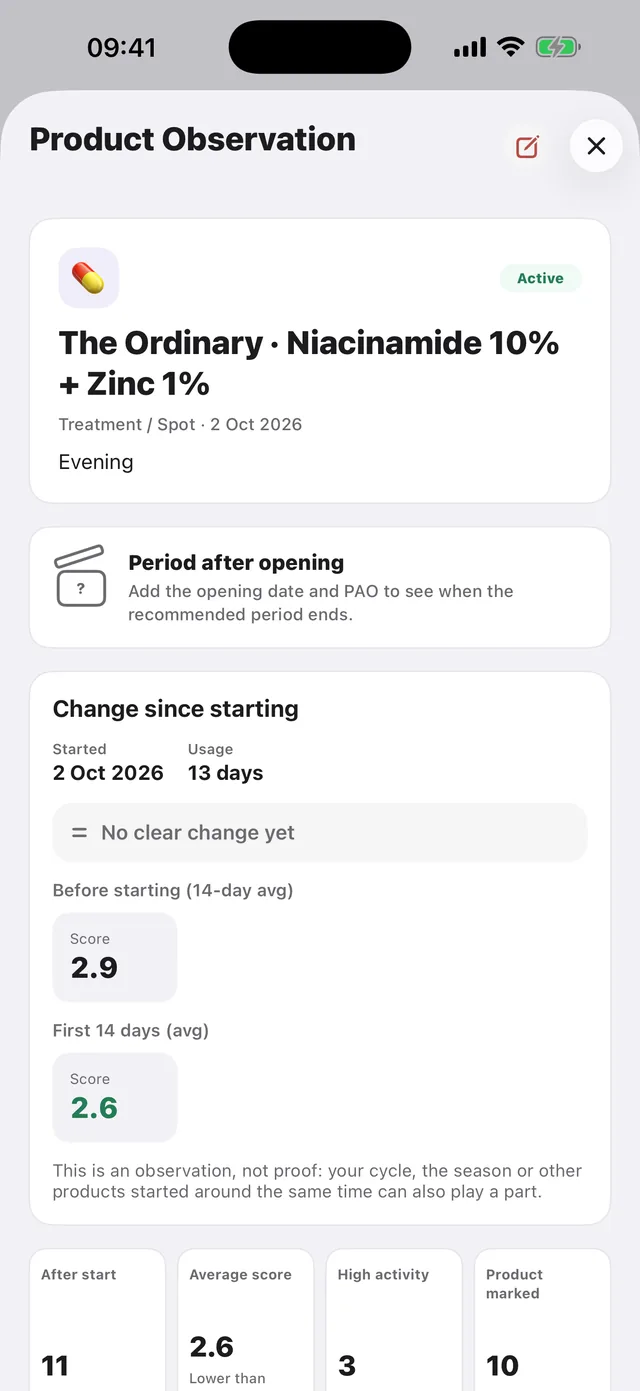
If you enter the opening date and PAO, the product card shows when the recommended period ends. If you want, you get a notification 14 days before it ends and on the day. This is for information only; the instructions on the label come first. For what the symbol means, read what does the PAO symbol mean.
Ingredient notes
For products with an ingredient list, Skinjot notes ingredient pairs whose combined use is often discussed. For example, if one product lists one ingredient and another product in your routine lists the other, you'll see it. These notes are general information, not personal advice; you can talk to your dermatologist about how to use them.
Skinjot can also list ingredients shared by more than one product after which your skin got worse. That is an observation too; it doesn't prove the ingredient caused it.
Product impact: before and after
The average of the 14 days before you started sits next to the first 14 days of use: the overall score and each symptom on its own. Each side needs at least 5 entries. The result is summed up in one line, like "possible improvement in dryness" or "redness looks higher". Small differences count as "no change".
This screen doesn't establish cause. Other things may have changed in the same period. If you want to patch test a new product before you start, read how to patch test skincare.
Experiments
You can follow a product, a diet change or a habit for a set period and compare your entries before and after. Experiments are free. Products also show up in insights and in your dermatologist report.
Free: the product add wizard, barcode and label reading, PAO and opening date, routine, ingredient notes and experiments. Pro: the product timeline, meaning the before / after comparison, and insights with charts. See pricing.
FAQ
Can I add a product without a barcode match?
Yes. Search by name or type the details yourself. You can also read the ingredient list from a photo of the label.
Does the label photo go to a server?
No. The ingredient list is read on your phone with Apple's on-device text recognition.
Does Skinjot recommend products?
No. Skinjot doesn't recommend products or treatments. It only shows the products you use next to your own entries.
How many entries do I need to see product impact?
At least 5 entries in the 14 days before you started and at least 5 in the first 14 days of use. That's why logging before you add a product helps.