 Skinjot
Skincare medication reminder
Reminds you about your medication, supplement or cream on your schedule, and keeps a record of when you used it.
Who it's for
If your dermatologist suggested a cream, a tablet or a treatment used on certain days, keeping track of what you did when gets hard. Some treatments are daily, others a few days a week. At your follow-up you also want a clear answer to "did you use it regularly?". Skinjot combines the two: a reminder and a record.
Skinjot doesn't recommend doses or treatments. You decide what to use and how with your doctor; the app only reminds you of the plan you entered.
Add it in a few steps
- What are you adding? Medication, supplement, cream, serum, cleanser or other (mask, toner, sunscreen and so on).
- Search or add it yourself: if it's not listed, type the name.
- Dose and how it's used: for example "1 tablet" or "pea-sized"; oral, topical or other.
- Reminder: pick the time and which weekdays.
Today and tomorrow
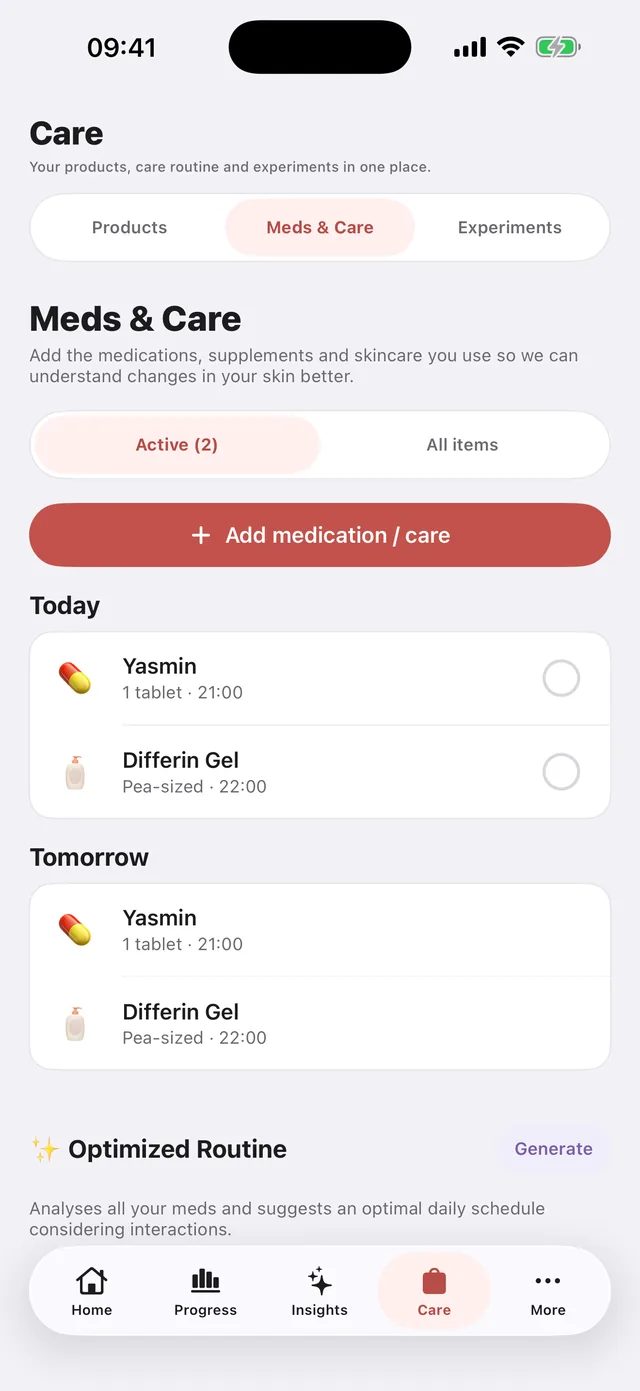
The Meds & Care screen shows "Today" and "Tomorrow" lists. Tick an item off with one tap. If nothing is scheduled today, it says so plainly.
Taken, skipped or snooze
A notification arrives at the reminder time. Tap the item in the list and a short usage log opens with one question: did you take it?
- Taken: logged as used.
- Skipped: logged as skipped.
- Snooze reminder: you're reminded again in 15 minutes.
Reminders are scheduled on your phone. If notifications don't arrive, check iPhone Settings › Notifications › Skinjot; you can choose which reminders you want, one by one, in the app's settings.
Usage history
Each item's history shows on a calendar: taken, skipped or partial, with a short summary of how many scheduled doses you logged this month. When you stop an item, tap "I stopped using it"; its history is kept and you can start it again later.
This history is especially useful for long treatments. If you keep an isotretinoin side effects diary or a tretinoin diary, the days you used it sit right next to your entries.
How did your skin change alongside it?
In Pro, an item's "Effects" tab charts how your weekly symptom average changed since you started. The chart needs at least 2 weeks of check-ins after starting. This is an association, not proof of cause. Medications and supplements can also be included in your dermatologist report.
Free: adding meds and care items, time and weekday selection, taken / skipped / 15-minute snooze and the usage history calendar. Pro: the product timeline, meaning the charted view of your symptoms after starting an item. See pricing.
FAQ
Can I set reminders for certain weekdays only?
Yes. For each item you choose the time and which weekdays.
How long is the snooze?
15 minutes. Tap "Snooze reminder" in the usage log and you're reminded again 15 minutes later.
Do reminders work without internet?
Reminders are scheduled on your phone, so notifications don't need an internet connection.
Does Skinjot suggest doses?
No. Skinjot isn't a medical device and doesn't recommend treatments or doses. You set the dose and use with your doctor; the app only reminds you of your plan.